
A Google Business Profile is the free Google listing that shows your business on Google Search and Google Maps: your name, hours, phone, photos, reviews, and a “Directions” and “Call” button. For a local business it’s the single highest-impact free thing you can do, because more potential customers see it than will ever visit your website. To set it up right: claim and verify the profile, choose the most accurate primary category, list every service you offer, set your service area, add real photos, and keep it active. The category and service fields matter most; here’s why, and how to do each step.
Most owners do about half of this, stop, and never look at it again. That half-finished profile is leaving customers on the table every week. The good news is the whole thing is free, and the parts that matter most take the least design skill; they’re just fields you fill in correctly.
What is a Google Business Profile, and why is it your real front door?
Your Google Business Profile is the listing Google shows when someone searches your business or your service nearby. It’s the box with your name, hours, phone, photos, and reviews, plus the “Call” and “Directions” buttons, and it’s what puts you on the map in Google Maps.
Google Business Profile: the free listing that represents your business on Google Search and Google Maps. It’s separate from your website: Google hosts it, and you claim and control it.
Here’s the reframe that changes how owners treat it: this profile is your real front door. Far more people see it than will ever click through to your website. Someone searching “[your service] near me” sees your listing, your reviews, and your “Call” button; a lot of them decide right there, without ever visiting your site. If your front door is half-built, that’s the impression you’re making.
Picture how a new customer actually finds you: they search on their phone, a short list of businesses comes up with star ratings and a “Call” button, and they tap one, often before a single website finishes loading. That whole decision happens on the profile. A complete one (real photos, current hours, answered reviews) wins that tap; a sparse one gets scrolled past, even when your work is the best in town.
How do you claim and verify it?
You claim a Google Business Profile by searching your business on Google, selecting “Claim this business” (or creating the listing if it doesn’t exist yet), and then proving to Google that you’re the owner. Verification is Google’s way of confirming you actually run the business.
The steps:
- Go to google.com/business and sign in with a Google account you control (use a business one you won’t lose access to).
- Search for your business. If it already exists, claim it. If not, create it.
- Enter your name, category, service area or address, phone, and website exactly as they appear everywhere else.
- Verify, usually by a code sent via phone, text, email, or sometimes a video. Google decides the method.
Verification can take a few days, so start it early. Until you’re verified, you can’t fully control what shows.
A few things smooth this out: use a Google account tied to the business, not a personal one you might lose access to; make sure your name, phone, and address match what’s on your website and other listings before you submit, since mismatches can slow verification; and if a listing already exists, claim it rather than creating a second one, or you’ll end up with duplicate listings that split your reviews and confuse Google about which is really you.
Which fields actually matter most?
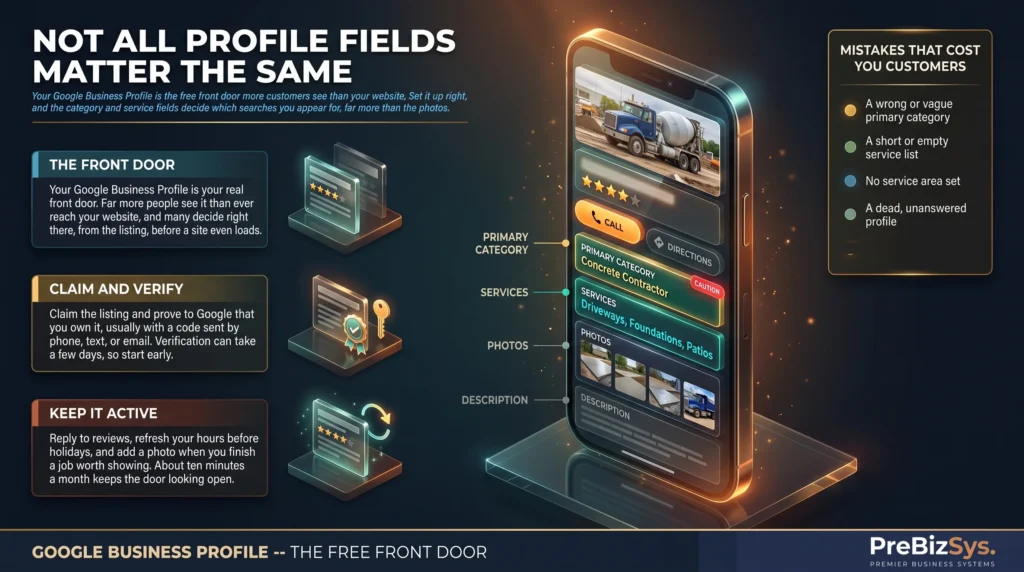
Not all fields pull the same weight. Most owners pour energy into the description and the photos and skip the two fields that actually decide which searches you show up for. Here’s the priority order that matters:
- Primary category: the single most important field. It tells Google what you are, which decides which searches you’re even eligible to appear for. “Concrete contractor” and “ready-mix concrete supplier” surface for different searches.
- Services: list every service you offer, in plain terms customers actually type. Each one widens the set of searches you can show up for.
- Service area (or address) and hours: where and when you operate. Wrong or missing here, and you’re filtered out of nearby results.
- Photos: real ones of your work, your team, your trucks. They build trust and get clicks, but they don’t decide eligibility the way the category does.
- Description: useful for a human reading your profile, but it barely moves which searches you appear for. This is the field owners over-invest in.
One practical tip for the services list: use the words customers use, not the words on your invoice. People search “dumpster rental,” not “roll-off container logistics.” Match their language and you match their search.
This isn’t a hunch; it’s the work we do first on every build. On our concrete supplier (Dockside Ready Mix) and our dumpster-rental company (1-888-Dumpster), choosing the right primary category changed which searches the business was even eligible to appear for. We’re not claiming that won a ranking. We’re telling you the mechanism: the category sets the door you’re allowed to stand in. Pick the wrong one and you’re invisible for the searches that bring jobs, no matter how good your photos are.
What about Posts and Q&A?
Posts and Q&A are two free profile features almost nobody uses, which is exactly why they’re worth a few minutes. Posts are short updates (an offer, a job you just finished, a seasonal note) that show on your profile. Q&A lets anyone ask a question on your listing, and lets you answer it, or pre-post the questions you already get all the time.
You don’t need to treat these like social media. Seed the Q&A with three or four real questions and answers (“Do you deliver on weekends?”, “What’s your minimum order?”). Drop a Post when you have something genuine to say. Both signal an active, attended business, to customers and to Google.
What mistakes quietly cost you customers?
Most lost-customer problems on a profile aren’t dramatic; they’re small, quiet, and fixable:
- Wrong or vague primary category: the single most common one; it locks you out of the right searches.
- A short or empty service list: every service you don’t list is a search you can’t show up for.
- No service area set: Google can’t tell where you work, so it doesn’t show you to nearby searchers.
- A dead profile: no updates, no review replies; Google and customers both read that as “maybe closed.”
- Mismatched phone or address: if your details differ between your profile, your website, and other listings, it erodes trust on both sides.
That last one matters more than it looks: consistency across every place your business appears is what lets both Google and customers be sure it’s really you.
How do you keep it from going stale?
You keep a profile healthy with a light, regular rhythm, not a marketing project. A neglected profile slowly slips: hours go out of date, reviews pile up with no reply, and the listing starts to look abandoned.
A low-effort routine that holds: reply to every new review within a few days, check your hours before any holiday, add a photo when you finish a job worth showing, and glance at the whole thing once a month. Ten minutes a month keeps your front door looking open for business.
There’s a quieter reason to stay active, too: a profile that’s current and answered reads to Google as a live, trustworthy business, and to a customer as one that’ll actually pick up the phone. An abandoned-looking listing plants the opposite doubt, and you never hear about the calls it cost you.
Setting it up right is genuinely the highest-impact free move a local business can make, but the fields are fiddly, and the category choice is easy to get wrong in a way you’d never notice. Don’t want to wrestle with the categories and service fields? We’ll set up and optimize your Google Business Profile for you: claim, categories, services, photos, the works, so the front door’s done right the first time.